
Long-form YouTube is the one webinar-promotion channel that keeps working after you stop posting: a single edited talk — titled for search and split into chapters — stays discoverable for months or years and quietly registers attendees the whole time, while a Reel, a tweet, or a story is effectively dead within a day. For a Los Angeles coach or course creator, that turns YouTube from “another feed to fill” into an evergreen registration engine sitting underneath every live and evergreen webinar you run.
Most webinar operators live on a promotion treadmill. You spend two weeks blasting the launch across email and social, fill the room, present, and then the promotion evaporates — so you start from zero for the next one. YouTube breaks that cycle because it is a search engine, not a feed. The video you publish today can still be sending you registrants next spring. This playbook lays out why that works, what to actually publish, how to wire the viewers into your GoHighLevel so they become booked calls, and how a done-for-you social media content engine runs the whole thing when consistency — not strategy — is the real bottleneck.
Table of contents
- Why YouTube is the evergreen engine your webinar funnel is missing
- Ephemeral vs. evergreen: why one YouTube video outworks a month of Reels
- What to publish: turning one webinar into a YouTube library
- From viewer to registrant: closing the loop with GoHighLevel
- Why this matters for Los Angeles coaches and creators
- The real bottleneck is consistency: DIY vs. a done-for-you engine
- FAQ
Why YouTube is the evergreen engine your webinar funnel is missing
YouTube matters for webinar businesses because it combines the largest audience online with the mechanics of a search engine — so the teaching content you’re already creating can be discovered by strangers with buying intent long after you publish it. That’s a fundamentally different value than a social feed, where reach is a one-day event.
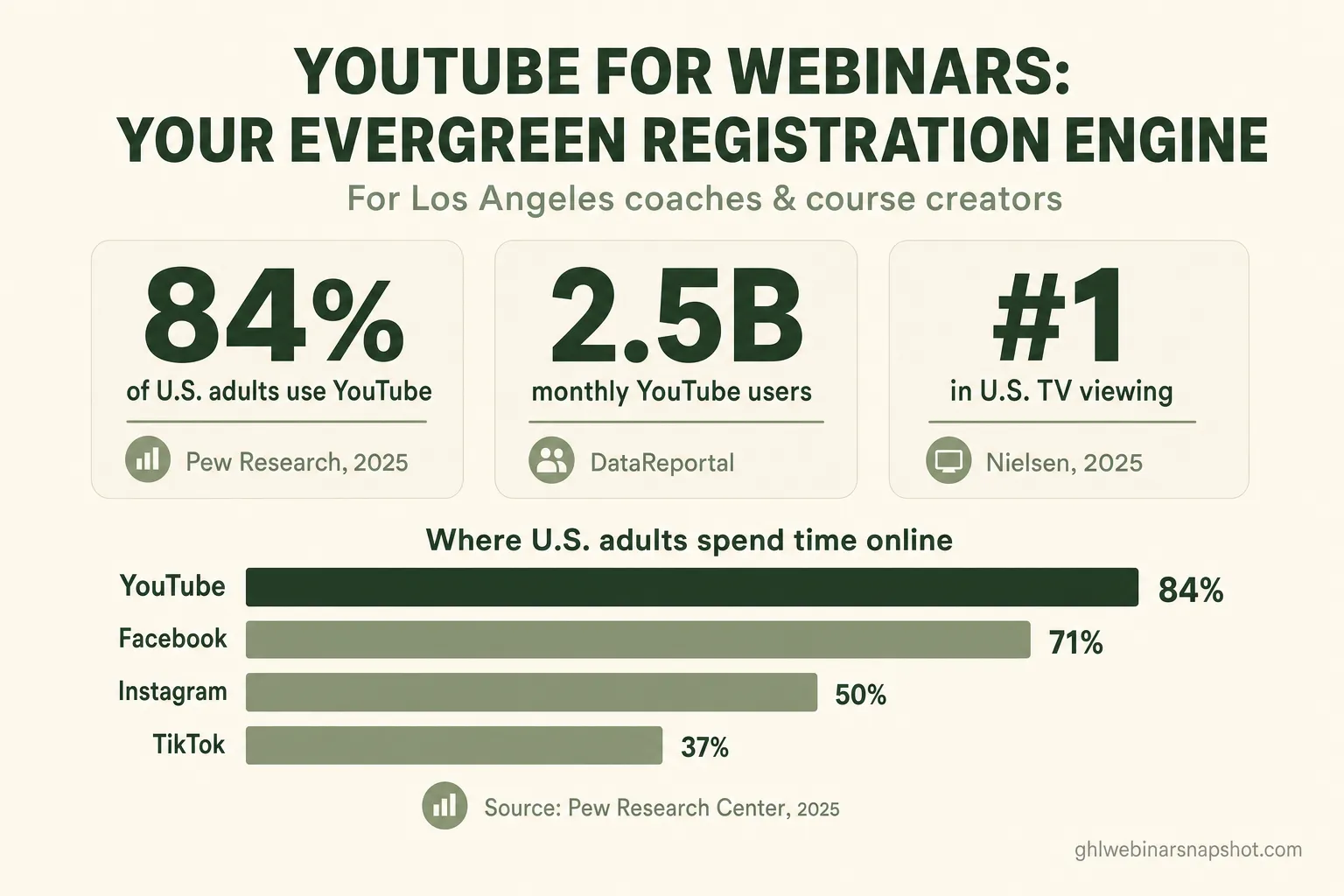
Start with the size of the room. 84% of U.S. adults use YouTube, making it the single most widely used online platform in America — ahead of Facebook at 71% and Instagram at 50%, according to Pew Research Center’s 2025 survey. Globally, the platform reaches roughly 2.5 billion monthly active users and people watch over a billion hours a day (DataReportal). Whoever your webinar is for, they have a YouTube account and they use it.
Now the part most operators miss: YouTube behaves like a search engine. It’s the second most-visited website in the world behind Google, and it’s frequently described as the second-largest search engine because so much of its traffic is people typing a query and looking for an answer. That’s the exact behavior your best prospects exhibit before they buy — they search “how to launch a group coaching program” or “B2B demo that actually closes,” and they want a real person to teach them. Pew has found that 51% of YouTube users say the platform is very important for helping them learn how to do things they’ve never done before (Pew, 2018) — which is precisely the intent that fills a teaching webinar.
The business case for putting your teaching on video is just as clear. In Wyzowl’s 2025 research, 85% of video marketers say video has helped them generate leads, 82% say it increased web traffic, and 93% say it increased users’ understanding of their product or service. Your webinar is already video; YouTube is simply where you let it keep working.
Ephemeral vs. evergreen: why one YouTube video outworks a month of Reels
Short-form social and long-form YouTube solve two different problems: social buys you a spike of reach today, while YouTube buys you a slow, compounding stream of discovery for months — and a webinar business needs the second one to escape the launch-and-crash cycle. Both belong in the mix, but only one keeps registering attendees while you sleep.
The difference is lifespan. Commonly cited social-media data pegs the useful life of a tweet at around 15–20 minutes, a Facebook post at roughly five hours, and an Instagram post at about a 19-hour half-life — while a YouTube video keeps being surfaced for days, months, and often years, because it’s indexed and served on intent rather than pushed once through a feed. A Reel promoting Tuesday’s webinar is irrelevant by Wednesday. A YouTube talk titled for what your buyers search is still being found next quarter.
Evergreen isn’t only a metaphor about time — it’s now literally where long-form is watched. Nielsen’s The Gauge reports that YouTube is the single largest media distributor of U.S. TV viewing, holding the #1 share among media companies for months running in 2025 at roughly 12–13% of all TV time. People are watching full-length YouTube content on the living-room screen, leaning in — the opposite of a thumb-flick past a Reel. For a webinar host, that’s the audience you want: someone willing to give you 20 minutes, not two seconds.
This is the strategic reason to run both formats deliberately. Short-form clips are your discovery net — if you want the tactical version, see our webinar-to-Reels repurposing playbook. Long-form YouTube is your evergreen library, the searchable back catalog that keeps a steady trickle of qualified strangers landing on your registration page. And because the average live webinar only sees a 47.7% show-up rate, you never want to depend on a single event’s turnout — you want a machine that keeps refilling the top of the funnel between launches. If you’re still deciding between formats, our evergreen vs. live comparison breaks down which model fits which offer.
What to publish: turning one webinar into a YouTube library
You don’t need to become a YouTuber — you need to convert the webinars you already run into a small, well-organized library of searchable long-form videos. One 45–60 minute session becomes several assets, each engineered to be found and to send the viewer toward registration.
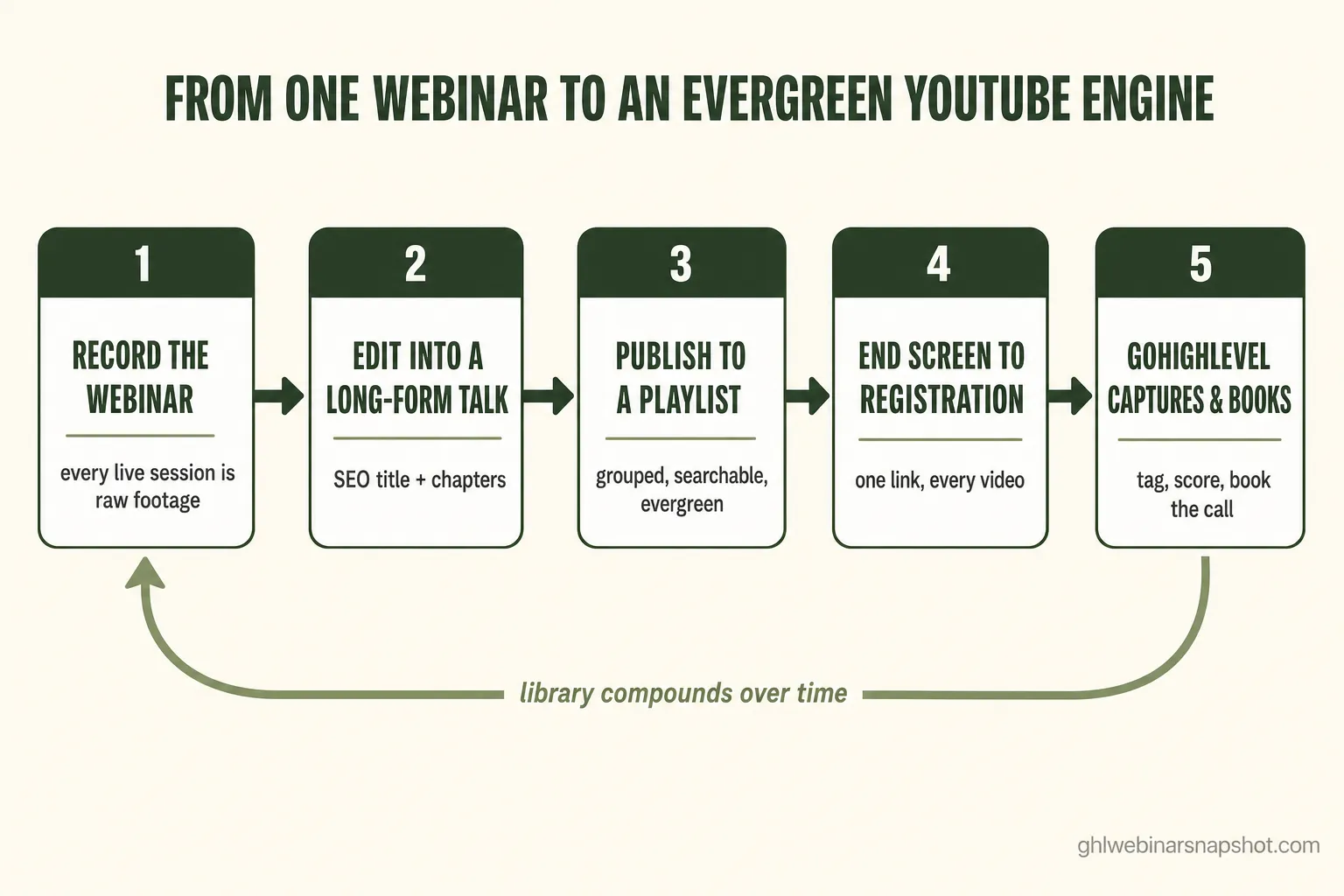
Here’s the repeatable production loop that turns a live event into evergreen inventory:
- Record the full session. Every live or evergreen webinar is raw footage. Keep the clean teaching segments; you’ll cut the housekeeping and the hard pitch.
- Edit into a long-form “talk.” Trim to the 15–30 minute core lesson so it stands alone as a genuinely useful video, not an obvious sales replay. This is the asset that earns watch time and search ranking.
- Title and describe it for search. Write the title the way your buyer types their problem — outcome first, not your webinar’s clever name. Put the real query in the first line of the description, and add a link to your registration page at the top of that description.
- Add chapters. Timestamped chapters make a long video skimmable and help YouTube (and Google) understand and surface each section — the same reason 93% of marketers say video improves understanding of what they offer (Wyzowl, 2025).
- Organize into playlists. Group talks by theme (“evergreen webinar setup,” “closing high-ticket coaching”) so one view rolls into the next, and each playlist becomes its own discoverable entry point.
- Cut 3–5 short clips per talk as feeders. Post them to Shorts, Reels, and TikTok to pull cold viewers back to the long-form video and the channel.
- Close every video with a call to register — an end screen, a pinned comment, and a description link, all pointing at the same registration page.
Do this after each webinar and, within a couple of months, you’ve built something a single Reel can never be: a browsable, searchable body of teaching that markets the next webinar on its own. That’s the “engine” — it runs on inventory, and every session you host adds to it.
From viewer to registrant: closing the loop with GoHighLevel
A YouTube view is worthless to a webinar business until it becomes a tracked contact on a registration list — so the real work is the plumbing that carries a viewer from the video into your GoHighLevel and onto the calendar. This is where most creators leak the audience they worked to earn: the views go up, but nothing lands in the CRM.
The connective tissue is straightforward when it’s built deliberately:
- Every path leads to one registration page. End screens, pinned comments, and the description link all point to the same fast registration page, so intent has exactly one place to go.
- Capture the questions, don’t lose them. A comment asking “is this good for a service business?” or a DM saying “when’s the next one?” is a hand-raise. An AI web-chat and DM agent can answer instantly, in your voice, and register the person or book a call — 24/7, without you refreshing a notifications tab.
- Tag the source. When a registrant comes from YouTube, tag them so you can see which videos actually drive booked calls — the start of real multi-touch attribution instead of guessing.
- Score and route. Someone who watched a full talk and then registered is warmer than a cold ad click. Lead scoring surfaces those buyers so your follow-up and your live-room attention go to the right people first.
Wired together, the loop is: a stranger searches a problem → finds your evergreen talk → registers from the end screen → gets your reminder cadence → shows up → and the hot ones book a sales call. The webinar snapshot we build installs exactly this backend — the registration flow, reminder sequences, tagging, scoring, and booking — so the traffic YouTube sends you actually converts instead of evaporating.
Why this matters for Los Angeles coaches and creators
Los Angeles is the most competitive attention market in the country — it’s the content-creation capital, packed with coaches, course creators, and founders all fighting for the same eyeballs — so an evergreen, search-driven channel is worth more here than almost anywhere. In a city where everyone can shoot a slick Reel, the operators who win long-term are the ones building a searchable library that compounds while competitors restart their promotion from zero every launch.
LA’s advantages cut both ways. The talent, the production resources, and the creator culture make great video easy to produce — but they also mean the feed is saturated and organic reach is fiercely contested. Paid reach in a market this crowded is expensive, and it stops the moment you stop paying. An evergreen YouTube library is the opposite: front-loaded effort that keeps returning traffic, so a Los Angeles coach isn’t renting attention by the click but owning a discovery asset that appreciates. Whether you serve local founders in Silicon Beach or a national audience from an LA studio, the same math holds — the video you publish this month should still be filling webinars long after the launch email is forgotten.
The real bottleneck is consistency: DIY vs. a done-for-you engine
Almost no one quits YouTube because the strategy was wrong — they quit because the weekly grind of editing, titling, publishing, cutting clips, and answering comments collides with actually running the business. The strategy on this page is simple. Executing it every single week, for months, until the compounding kicks in, is the hard part. That’s the honest case for outsourcing it.
Running your YouTube engine: DIY vs. a done-for-you team
| Feature | Done-for-you engine | Doing it yourself |
|---|---|---|
| Weekly publishing cadence, sustained for months | Handled — it ships on schedule | First to slip when you get busy |
| Editing long-form + cutting short-form feeders | Team of editors | Hours of your week, every week |
| SEO titles, descriptions, chapters, playlists | Done per video | Usually skipped under time pressure |
| Comments + DMs answered and converted to registrations | AI agents, 24/7, in your voice | Missed or answered days late |
| Wired into your GoHighLevel + tagged | Built in | Manual, if it happens at all |
| Monthly performance reporting | Included | Rarely tracked |
Our done-for-you social media service is built for exactly this: a team that plans, writes, designs, films, schedules, and publishes across YouTube and eight other channels — plus AI agents that answer comments, DMs, and web chat and register those viewers straight into your GoHighLevel. You keep teaching and closing; the engine keeps running. For a webinar business, that’s the difference between “we should really post more on YouTube” and an evergreen channel that quietly fills rooms every week.
If you’re weighing whether to build this in-house or hand it off, our DIY vs. done-for-you social media breakdown walks through the real cost of each path.
FAQ
Is long-form YouTube really better than Reels for filling webinars?
They do different jobs, so the answer is 'use both, deliberately.' Short-form clips (Reels, Shorts, TikTok) win you a spike of reach today and act as a discovery net. Long-form YouTube is your evergreen, searchable library: because YouTube is the second most-visited website in the world and behaves like a search engine (DataReportal, 2025), a well-titled talk keeps being found for months while a Reel is effectively dead within a day. For a steady stream of registrants between launches, long-form is the compounding asset.
How many YouTube videos do I need before it starts working?
There's no magic number, but the engine compounds with inventory, so consistency matters more than volume. Publishing one solid long-form talk from each webinar you run — plus a few short clips as feeders — builds a browsable library within a couple of months. The videos that rank and the playlists that group them keep sending traffic long after you publish, which is why sustained cadence beats a single burst.
What should I actually publish from a webinar?
Edit each session down to its 15–30 minute core teaching segment so it stands alone as a genuinely useful video, not an obvious sales replay. Title it the way your buyer searches their problem (outcome first), add timestamped chapters, put your registration link at the top of the description, group it into a themed playlist, and cut 3–5 short clips to feed cold viewers back to it. Close every video with an end screen and pinned comment pointing at your registration page.
How do YouTube viewers actually become webinar registrants?
Through deliberate plumbing, not hope. Every end screen, pinned comment, and description link points to one fast registration page. Comments and DMs — which are hand-raises — get answered instantly by an AI chat/DM agent that can register the person or book a call in your voice, 24/7. Each registrant is tagged as coming from YouTube so you can see which videos drive booked calls, and lead scoring surfaces the warmest viewers for follow-up. That backend is exactly what our webinar snapshot installs into your GoHighLevel.
Does this work for evergreen webinars too, or only live ones?
Both — and evergreen webinars pair especially well with it. A YouTube library sends a steady, searchable stream of new prospects, and an always-on evergreen webinar is ready to receive them at any hour, without you hosting a live session for each one. Live events still benefit: the library keeps the top of the funnel full so each launch starts warm instead of from zero. Our evergreen-vs-live guide covers which model fits your offer.
I run a coaching business in Los Angeles and don't have time to run a channel. What are my options?
That's the norm, not the exception — the strategy is simple but the weekly execution (editing, titling, publishing, clipping, replying) is what collides with actually running your business. You can do it in-house if you have an editor and a social manager with spare hours, or hand it to a done-for-you engine that plans, edits, publishes across YouTube and eight other channels, and runs AI agents that convert comments and DMs into registrations in your GoHighLevel — from $397/mo. Either way, the goal is a consistent cadence sustained for months, because that's when the compounding kicks in.
About the author
Priya Shankar is a Course Launch & Conversion Coach based in Seattle, WA. She works with course creators and founders who teach to sell — masterclasses, demos, and high-ticket coaching webinars — and thinks as much about the offer and the room energy as the automation underneath it. Her writing connects the human side of a live event to the systems that capture, nurture, and book the people most ready to buy.
Related reading
- How to Turn One Webinar Into a Month of Reels: A Repurposing Playbook
- Evergreen vs. Live Webinars: Which Model Fits Your Offer?
- DIY vs. Done-for-You Social Media: The Real Cost of Each Path
- How to Book Sales Calls From Webinars: The Attendee-to-Consult Playbook
- The Best Time to Host a Webinar (2026 Data)
Sources
- Pew Research Center — Americans’ Social Media Use 2025 (84% use YouTube)
- DataReportal — Essential YouTube Stats (2.5B users, 2nd most-visited site, 1B+ hours/day)
- Pew Research Center — Many Turn to YouTube for How-To Lessons (51% learn how to do things)
- Wyzowl — State of Video Marketing (85% generate leads, 82% traffic, 93% understanding)
- Nielsen — YouTube Largest Share of U.S. TV Viewing (The Gauge, 2025)
- Scott Graffius — Lifespan (Half-Life) of Social Media Posts (2026 update)
- Livestorm — 2026 Webinar Benchmark Report (47.7% average show-up rate)