
It’s 6:52pm, your webinar starts at 7:00, and you’re refreshing the attendee count on a tool you picked in a hurry eight months ago. Forty-one people are in the room out of the 190 who registered. You built a good talk and the offer is solid, but you’re about to pitch to a fifth of the people who said they’d show up, because the software you chose to fill the room never actually helped you fill it.
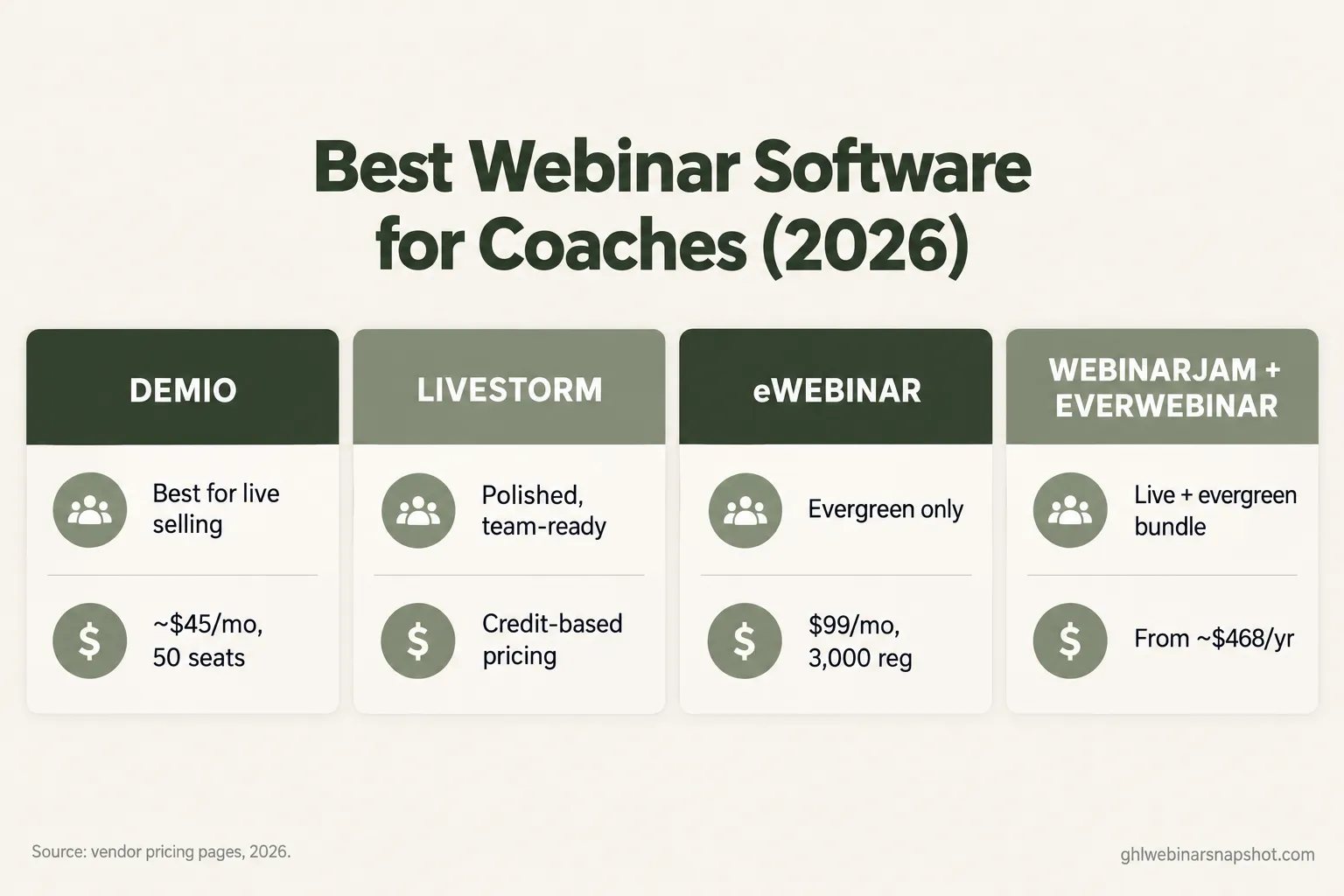
Here’s the short answer for a coach in 2026: Demio is the best all-round pick for live selling webinars, Livestorm fits teams that want polish and don’t mind credit-based billing, eWebinar is the cleanest evergreen-only tool, and WebinarJam plus EverWebinar is the classic live-and-automated bundle for course sellers who want both in one house. None is “the best” in a vacuum. The right one depends on whether you sell live or evergreen, how big your list is, and how much follow-up you want the tool to handle. Below is the honest version, with real prices and the part every vendor leaves out.
Table of contents
- What picking wrong actually costs you
- The four tools at a glance
- The 8 things that matter, tool by tool
- Which one is right for your stage
- The layer none of them include
- Steal this: the reminder cadence that lifts show-up on any platform
- The compliance line most coaches miss
- Common objections, answered
- FAQ
What picking wrong actually costs you
Coaches obsess over the room-size cap and ignore the two numbers that decide whether a webinar earns money: how many registrants show up, and how many of those book a call or buy.
Start with show-up rate, because everything downstream multiplies off it. Livestorm’s 2026 benchmark, built on 4.35 million registrations across 33,786 sessions, puts the average live show-up rate at 51.3% in 2025, up from 48.9% the year before. Half your registrants never see the pitch. The same report found the average attendee watches 26 minutes of a 68-minute session, so even the ones who show up drift long before the offer.
Average live webinar show-up rate, % of registrants who attended. Source: Livestorm 2026 Webinar Benchmark Report (4.35M registrations, 33,786 sessions).
Now do the math. Say you run two webinars a month, 200 registrants each. At the 51% average you get about 102 people live. Push that to 62% with a tighter reminder cadence and you get 124, another 44 attendees a month hearing your offer. If one in twenty books a call and one in four of those buys a $2,000 program, those extra attendees are worth roughly $4,400 a month. The tool didn’t write your talk. Its reminder system, or the one you bolt on, moved the number.
That’s the lens for this comparison. Not “which has the biggest room,” but “which helps me get the people I already paid to acquire into the room, and onto a call.”
The four tools at a glance
I’m comparing the four platforms a coach shortlists: two live-first tools (Demio, Livestorm), one evergreen-only tool (eWebinar), and one live-plus-automated bundle (WebinarJam with EverWebinar). Enterprise broadcast tools like ON24 and BigMarker are a different animal for a different buyer; I’ve torn their pricing apart in the full webinar software pricing teardown.
| Tool | Best at | Entry price (annual) | Live? | Evergreen? |
|---|---|---|---|---|
| Demio | Live selling webinars | ~$45/mo, 50 seats, 1 host | Yes | Limited (recorded events) |
| Livestorm | Polished live + teams | Free, then credit packs from ~$1,000/yr | Yes | Yes |
| eWebinar | Automated / evergreen only | $99/mo, 1 webinar, 3,000 registrants | No | Yes |
| WebinarJam + EverWebinar | Live launches + replays in one house | WebinarJam from ~$468/yr; EverWebinar ~$99/mo annual | Yes (WJ) | Yes (EW) |
Lowest paid entry, billed annually, in $/month. Livestorm Pro is annual-only and credit-based (~$1,200/yr for a 400-attendee-credit pack, shown here as ~$100/mo equivalent). Sources: Demio, Livestorm, eWebinar, WebinarJam / EverWebinar pricing pages, 2026.
The 8 things that matter, tool by tool
Eight criteria decide this for a coach. I’ll run all four through each and flag where each breaks, because the failure mode is what you’ll live with.
1. Live experience and reliability
Demio runs fully in the browser, no download for attendees, with a clean interface and stable streaming that’s earned it a loyal coaching following. Its live room is built for selling: featured actions, offer pop-ups, handouts. Livestorm is the most polished of the four, strong for panels and Q&A-heavy sessions. WebinarJam packs the most live selling features but is most likely to feel clunky, and its reliability reputation is the weakest at scale. eWebinar has no live mode, so it’s out of this row.
Where it breaks: WebinarJam’s feature density is also its fragility. For a big live launch, rehearse on the actual plan you’ll use and have a backup room ready, which I cover in the tech-failure backup plan.
2. Evergreen and automation
This is where the tools split hardest. eWebinar is purpose-built for evergreen: just-in-time scheduling, simulated live chat, the smoothest automated experience of the four. EverWebinar is the veteran, powerful but dated, and the one most associated with fake “live” urgency you should use carefully. Livestorm supports on-demand sessions natively. Demio does recorded and series events but isn’t really an evergreen-funnel tool; if evergreen is your main model, it’s the wrong pick. Weighing the two models? Read evergreen or live first.
3. Reminders and no-show recovery
Every tool sends basic email reminders. The differences are thin, and that’s the point: none of them ships a real multi-touch SMS-plus-email cadence with no-show recovery out of the box. Demio and Livestorm send a couple of email reminders; WebinarJam/EverWebinar add limited SMS on higher tiers; eWebinar sends email tied to the scheduled session. If the reminder cadence is what moves show-up rate, and it is, all four leave the highest-impact work to you. Hold that thought for the automation section.
4. Replay and buyer signals
Getting people to the replay is easy. Knowing who watched to the offer is where money hides. All four report replay views to varying degrees, but none tags a hot replay-watcher and routes them to a booking link automatically. That’s a replay-tag pipeline you build in your CRM, not a checkbox in the webinar tool.
5. Booking the call
Selling coaching usually means booking a call, not a one-click checkout. None of these four is a scheduler. You’ll connect Calendly or a GoHighLevel calendar, and the seam between “watched the pitch” and “on my calendar” is manual unless you wire it.
6. CRM and integrations
Livestorm has the broadest native integration list and a real API. Demio integrates cleanly with the big email and CRM tools plus Zapier. WebinarJam/EverWebinar lean on their own ecosystem. If your business already runs on one CRM, the deciding question isn’t features, it’s whether registrant, attendance, and replay data lands there automatically or gets exported as a CSV you scrub by hand at 11pm.
7. Attendee cap and how price scales
Entry prices look close; scaling diverges fast. Demio is per host and steps up by room size. Livestorm bills per attendee credit, so a big evergreen program burns credits quickly. eWebinar scales by active webinars. WebinarJam steps through four tiers by attendee cap. Model your real volume, not the entry number.
8. Real total price at your scale
Entry prices cluster; the models diverge. Demio runs Growth around $75+/mo at 150 seats and climbs with room size. Livestorm Pro packs start near $1,000/yr at roughly $2.50-3 per attendee credit. eWebinar is $99-299/mo by active webinars, plus $49/mo per extra 1,000 registrants. WebinarJam tiers run $468-2,748/yr by attendee cap, and EverWebinar sits around $99/mo annual.
Where it breaks: the number that wrecks budgets is Livestorm’s credit model on an evergreen funnel. Credits are great for a few high-value live sessions. Run an always-on webinar to thousands of registrants a month and the per-attendee cost stops being cheap; eWebinar’s flat registrant tiers are far more predictable there.
Which one is right for your stage
The honest answer changes with your list size and how you sell. Run the same framework through three real stages.
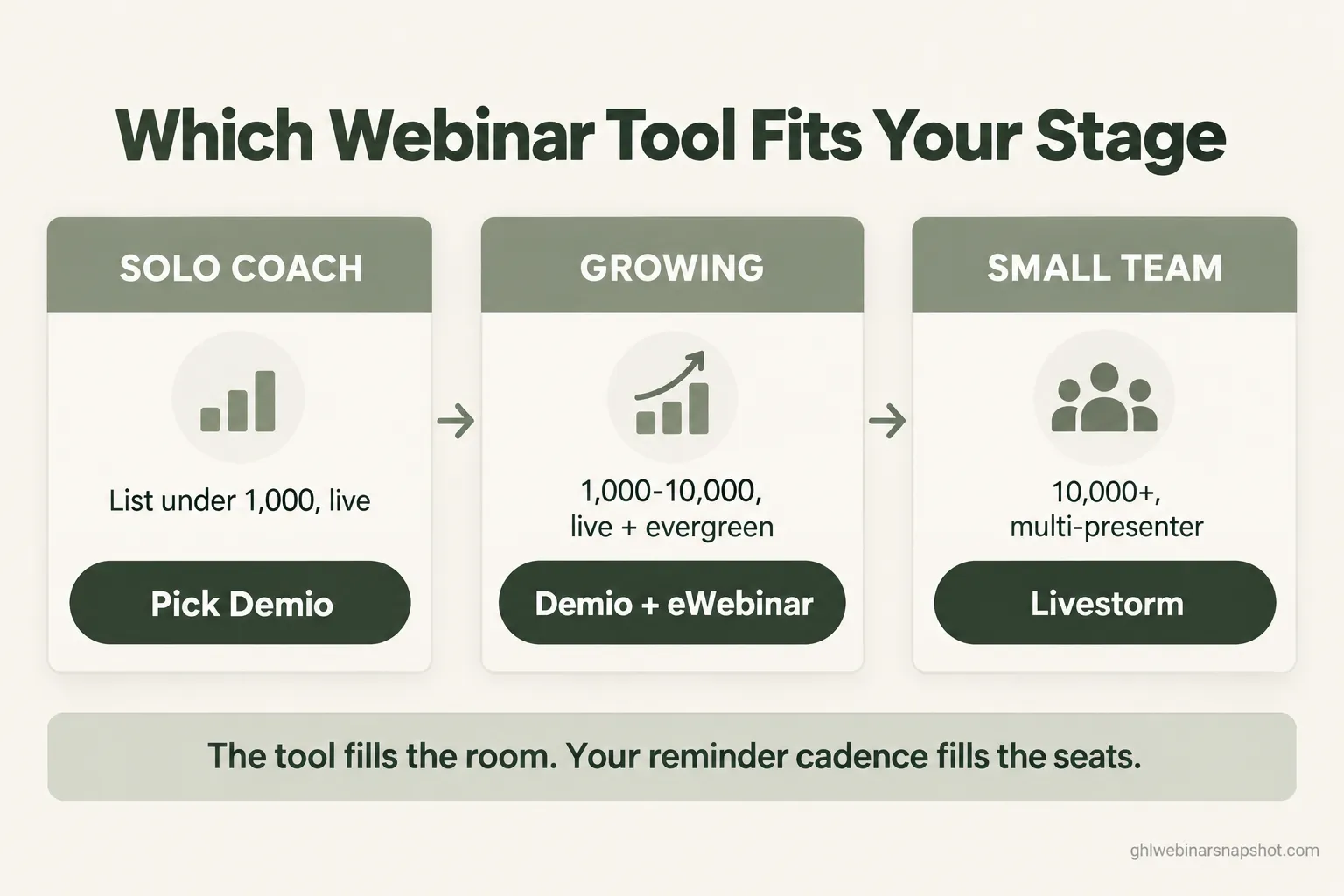
Solo coach, list under 1,000, selling live
You want the least friction and the lowest reliable cost. Demio is the pick: about $45/month annually, 50 seats, one host, no attendee downloads, a room built for pitching. If your registrants won’t fit in 50 seats, step to Growth for 150. Skip evergreen until your live webinar reliably converts; automating a funnel that doesn’t sell just automates a loss. Your edge at this stage isn’t the tool, it’s your reminder cadence, which costs nothing to improve.
Growing coach or small course, list 1,000 to 10,000, live plus evergreen
Now you want both models. Two clean paths. Path one: keep Demio for live and add eWebinar for the evergreen funnel, two focused tools that each do one job well. Path two: consolidate on WebinarJam plus EverWebinar so both live in one account. Path one gives the better room and the better evergreen experience; path two gives one login and one bill. Pick on whether you value best-in-class or one-house simplicity.
Small team or high-ticket, list 10,000+, multiple presenters
Per-host and per-credit pricing starts to sting here, and the deciding factor becomes team features, analytics, and how data flows into your CRM. Livestorm earns a serious look for its integrations, API, and team handling. But at this scale the webinar tool is the smallest part of your stack. Your reminder cadence, replay tagging, lead scoring, and attribution matter more than the streaming interface, and that’s exactly the layer none of these four builds for you.
The layer none of them include
Reread the eight rows and one pattern jumps out: the webinar tool fills and streams the room, and stops there. The reminder cadence that lifts show-up, the no-show recovery that recaptures the half who missed, the replay tag that flags a buyer, the booking flow that puts a hot attendee on your calendar, none of that is included in these four by default.
That’s not a knock on them. It’s the boundary of the category: they’re rooms, not systems, and the money in a coaching webinar lives on the far side of that boundary, in the follow-up. It’s why two coaches on the identical platform get wildly different results: one bolts a real automation layer onto it, the other sends a single “starting soon” email and hopes.
You can build that layer yourself. It’s roughly 40 hours of CRM work: registration workflow, a seven-touch reminder cadence, no-show branch, replay-watch tagging, lead scoring, and a booking handoff. I break down that build-it-yourself time cost elsewhere. Or you connect your webinar tool to a system that already has it. Either way, decide it deliberately, because it outweighs the tool choice you just spent an hour agonizing over.
Steal this: the reminder cadence that lifts show-up on any platform
This works regardless of which of the four you pick. It’s the seven-touch cadence that moves show-up from the low 50s toward the low 60s. Copy it, change the details, load it into whatever sends your reminders.
Two rules make this work. First, the SMS touches (4 and 6) do the heavy lifting, texts get read in minutes, but they’re also where compliance bites, so read the next section first. Second, touch 7 is the no-show recovery most coaches skip, and it’s often the highest-ROI message in the sequence because it re-engages the half of your list that never showed. Pair it with a proper no-show recovery flow and you recapture pipeline you already paid to acquire.
The compliance line most coaches miss
The cadence above includes SMS, and SMS is regulated. In the US, the TCPA requires prior express consent before you text someone, and since 2024 carriers enforce A2P 10DLC registration for application-to-person messaging. In plain terms: you need a registered campaign and documented consent (a checkbox at registration that clearly says you’ll text them), or your reminder texts get filtered or blocked.
None of the four handles this for you; if you add SMS you do it through a separate texting platform that must be registered. Two more lines to watch: if you record attendees on camera or audio, several states require all-party consent, and every reminder email must follow CAN-SPAM with a real opt-out. My SMS compliance guide for webinars has the checkbox copy you can paste. This is the operator’s version, not legal advice, so confirm your specifics with counsel.
Common objections, answered
“Can’t I just use Zoom, I already pay for it?” You can, and plenty of coaches start there. Zoom Webinars works for the live room, but it’s an add-on to a paid Zoom plan with thin selling features and basic automation. Fine as a room, weak as a selling system. If webinars are how you make money, a purpose-built tool plus a real follow-up layer pays for itself fast.
“Isn’t WebinarJam plus EverWebinar the obvious course-creator answer?” It’s the most common one, and the bundle is genuinely convenient: live and evergreen in one house. But convenience isn’t the same as best. Demio’s live room is cleaner and eWebinar’s evergreen experience is smoother. If you value one login and one bill, the bundle wins; if you value the experience your buyers have, the split stack often wins.
“Do I need to be technical to set any of this up?” For the webinar tool itself, no; all four are built for non-developers. The part that takes skill is the automation layer, the reminder cadence, no-show branches, replay tagging, and the booking handoff, because that lives in your CRM, not the webinar tool. That’s the piece coaches either grind through over a weekend or hand to someone who’s built it before. And a “we’re live now” text to someone who registered and consented is a favor, not spam, so long as it carries a STOP line.
FAQ
What is the best webinar software for coaches in 2026?
For live selling, Demio (about $45/month annually, 50 seats, one host). For evergreen funnels, eWebinar ($99/month). For both in one account, the WebinarJam plus EverWebinar bundle. The best tool depends on how you sell and how big your list is.
Is Demio or Livestorm better for a solo coach?
Demio is usually the better value for a solo coach selling live under about 150 attendees, since per-host pricing is fine with one host. Livestorm is more polished with broader integrations, but its per-attendee-credit billing suits teams and fewer, higher-value sessions.
What is the cheapest webinar platform for coaches?
Demio is the cheapest live entry at about $45/month annually; WebinarJam Starter is roughly $468/year. Livestorm has a free plan for testing. Cheapest entry is not cheapest at scale, so model your real attendee volume first.
Do I need both WebinarJam and EverWebinar?
Only if you run both live launches and evergreen replays. WebinarJam handles live, EverWebinar handles evergreen, and they are often bundled. Run only live and WebinarJam alone is enough; run only evergreen and eWebinar tends to feel smoother.
Can I run evergreen webinars on Demio?
Demio supports recorded and series events but is not a true evergreen-funnel tool with just-in-time scheduling and simulated chat. If evergreen is your main model, use eWebinar or EverWebinar, and many coaches pair Demio for live with eWebinar for evergreen.
Does any webinar platform send SMS reminders automatically?
Not as a complete cadence. All four are email-first (WebinarJam and EverWebinar add limited SMS on higher tiers), so a full multi-touch SMS-plus-email sequence with no-show recovery needs a separate, TCPA-compliant and A2P 10DLC-registered texting system.
Is Zoom Webinars good enough for selling from webinars?
It works as a live room, but it is an add-on to a paid Zoom plan with thin selling features and basic reminders. If webinars are a core revenue channel, Demio plus a real follow-up layer converts better than Zoom alone.
It’s 6:52pm again, but this time the count reads 118 out of 190, and still climbing because the one-hour text just went out. Same talk, same offer, same list. The only thing that changed is the reminder cadence behind the room did the quiet work of getting people in. Pick the tool that fits how you sell. Then build the layer that fills it.