
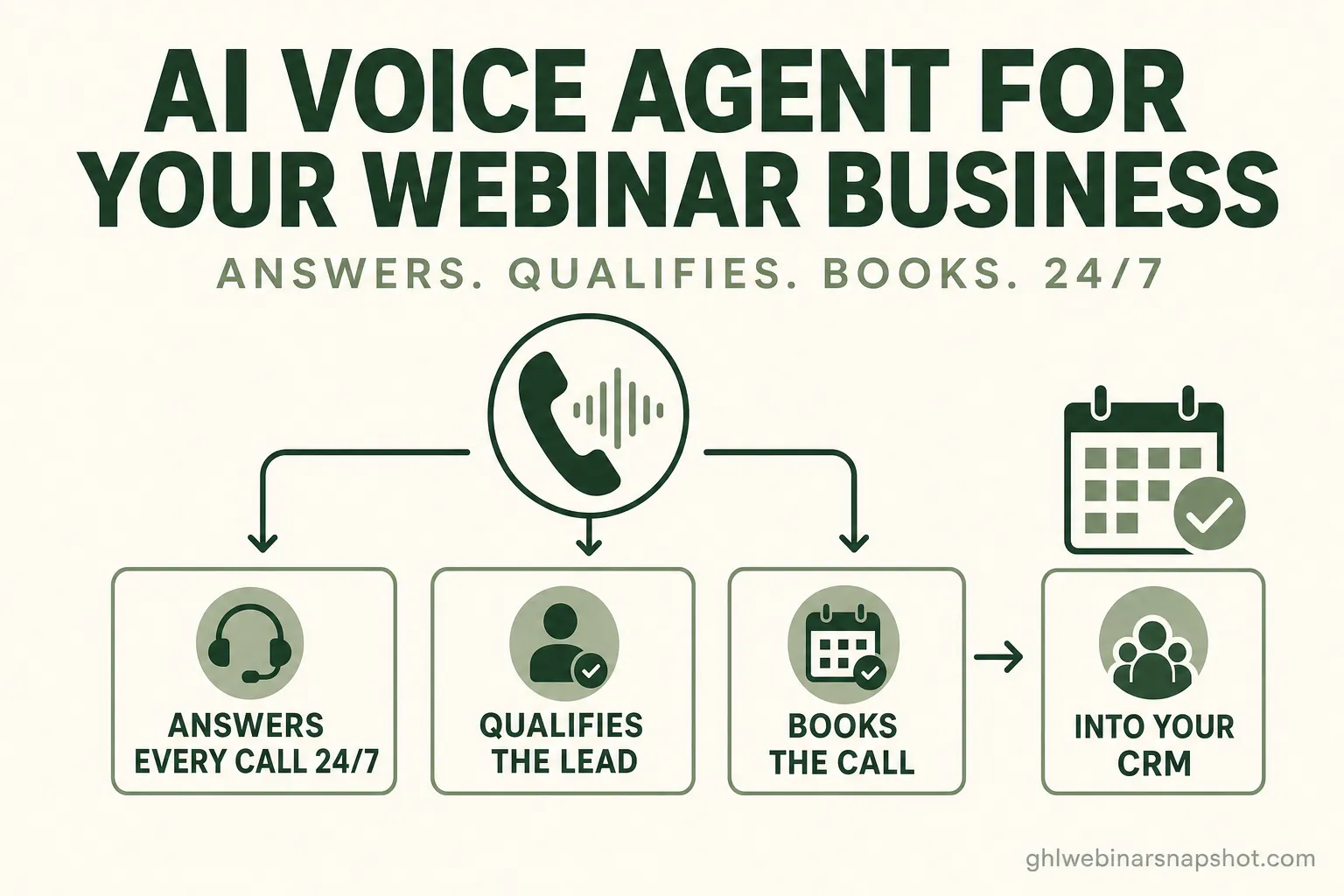
To set up an AI voice agent for a webinar business, you work through seven steps in order: map the calls you’re missing, choose a voice AI and connect your phone number, script the greeting and your qualifying questions, connect a calendar with booking rules, wire the whole thing into GoHighLevel, set your compliance posture (recording consent and TCPA), then test and monitor real transcripts before you scale it. Done in that sequence, a prospect who calls at 9 p.m. with one question before registering gets an instant answer, a booked seat, and a confirmation text — instead of voicemail and a lost sale.
This is the build guide, not the pitch. If you’re a Raleigh coach, course creator, or B2B founder still deciding whether an always-on phone agent is worth it, start with the case for why missed calls quietly drain a webinar funnel. This post assumes you’re past that and want the actual setup — the components, the order, and the places people get it wrong.
Table of contents
- What an AI voice agent actually does for a webinar business
- Why set one up: the gap it closes
- Before you start: what you need in place
- How to set up an AI voice agent: 7 steps
- Off-the-shelf voice bot vs. a custom agent trained on your funnel
- What this means for Raleigh webinar businesses
- FAQ
What an AI voice agent actually does for a webinar business
An AI voice agent is a natural-language phone agent that answers inbound calls 24/7, holds a real conversation, qualifies the caller against your ideal-attendee criteria, and either registers them for your next webinar or books a sales call — then logs the whole thing into your CRM. It is not a phone tree, and it is not voicemail. It’s the difference between a caller reaching a person-like conversation at 9 p.m. and a caller hanging up on hold music.
For a webinar operator, the job is specific. Someone sees your ad or your registration page, has one question standing between them and signing up — “is this live or a replay?”, “will I get the recording?”, “is this right for a beginner?” — and they call. A voicemail box turns that hot moment into a 42-hour follow-up gap. A voice agent turns it into a registered attendee before they hang up. The built-in AI Caller that ships with our snapshot does exactly this: it answers on the second ring, qualifies, and books or registers straight onto your calendar, then fires a confirmation text.
The three jobs it does that a human team can’t do reliably at 2 a.m.:
- Answer every call, instantly, at any hour. No queue, no “we’ll call you back,” no lead handed to the next result on Google.
- Qualify in the conversation. It asks the one or two questions that separate a ready buyer from a tire-kicker, so your calendar fills with the right people.
- Take the action. It books the call, registers the seat, tags the contact, and routes genuinely hot leads to a human in real time.
Why set one up: the gap it closes
You set up a voice agent to close two leaks at once: the speed gap (how fast a lead gets a response) and the availability gap (whether anyone responds at all outside business hours). Both are measurable, and both are brutal for anything slower than instant.
Start with expectation. Salesforce’s connected-customer research found that 64% of consumers and 80% of business buyers expect companies to interact with them in real time. That’s the standard your caller is holding you to — and a voicemail box misses it on the first ring.
Then the speed math. The Lead Response Management study of InsideSales.com data — more than 15,000 leads and 100,000 call attempts — found that contacting a lead within five minutes instead of thirty made a business about 21× more likely to qualify it. Now weigh that against the 42-hour average first response, with 23% of companies never responding at all, that Harvard Business Review found across 2,241 companies. A webinar is often only days away; a two-day follow-up misses the event entirely.
A voice agent is the only “team member” that hits both marks at once: it answers instantly and it never clocks out. That’s why the same logic that makes fast, behavior-aware AI webinar follow-up beat a slow drip applies to the phone — speed compounds, and the phone is where your highest-intent, ready-to-ask-a-question leads show up.
Before you start: what you need in place
Before you build, get five things ready — a GoHighLevel account, a phone number you can route, a calendar with real availability, a one-page definition of your ideal attendee, and your webinar logic (live vs. evergreen, replay window, price). Setup goes fast when these exist and stalls when they don’t.
How to set up an AI voice agent: 7 steps
The setup is seven steps: map missed calls, choose the voice AI and connect your number, script the greeting and qualifying questions, connect the calendar, wire it into GoHighLevel, set compliance, then test and monitor. Here’s each one.
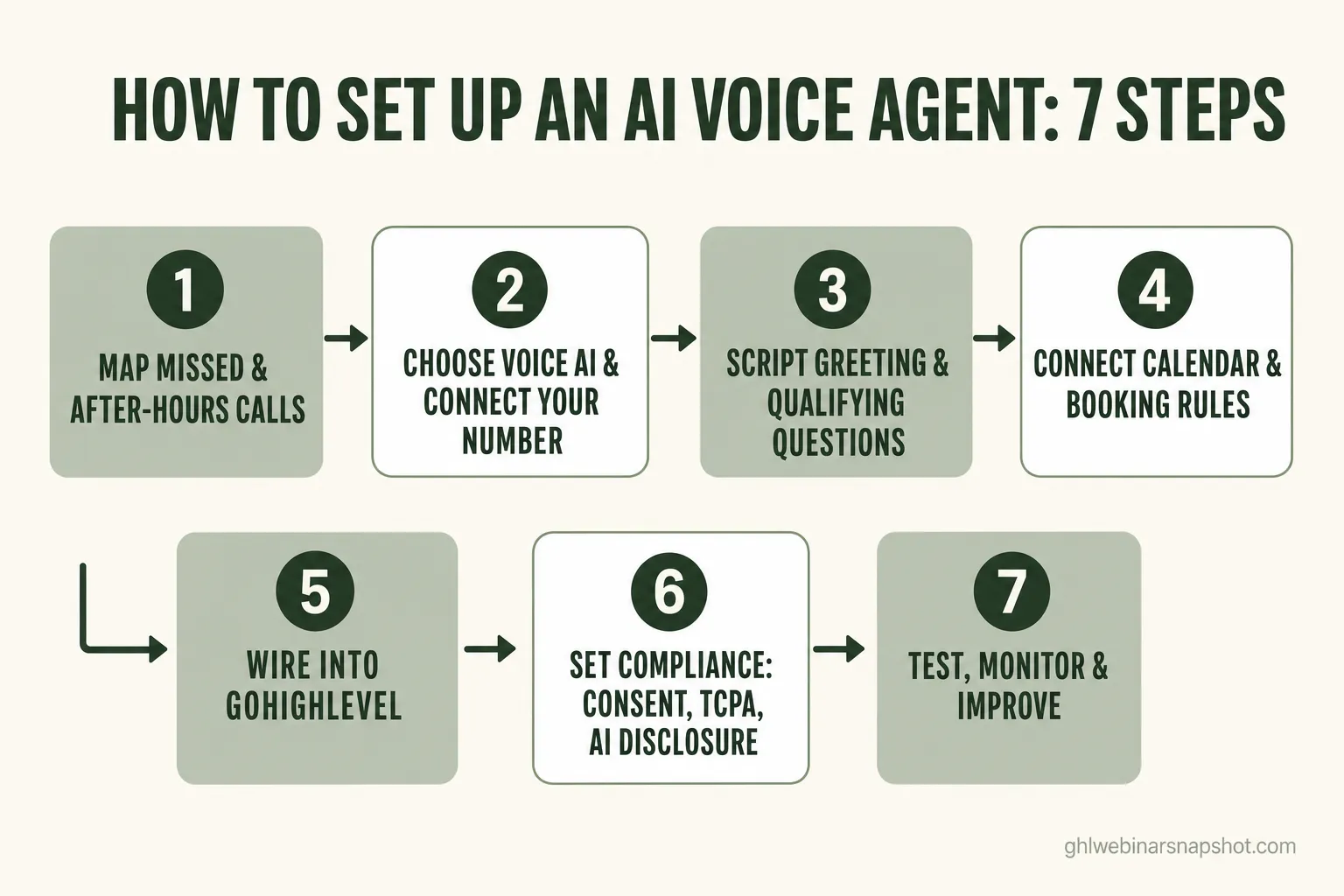
Step 1 — Map the calls you’re missing
Before you automate anything, find the leak. Pull your call logs for the last 30 days and count three things: calls that went to voicemail, calls that came in outside business hours, and calls you never returned within an hour. That number is your baseline — and usually the moment an operator sees it, the project pays for itself. Note why people call, too: those recurring questions become the agent’s script in Step 3.
Step 2 — Choose the voice AI and connect your number
Pick your voice platform. The common production stacks are VAPI or Retell for the voice layer, a reasoning model like Claude behind it, and Twilio for telephony — the same components our custom software team uses to build voice agents. Choose a natural voice (test it on a phone speaker, not headphones), set the language(s) you need, then point your business number or a new tracking number at the agent. Keep a human fallback: if the agent can’t help, it should warm-transfer or take a message, never dead-air the caller.
Step 3 — Script the greeting and your qualifying questions
This is where most of the quality lives. Write a short greeting in your brand’s voice, then the two or three questions that qualify a caller against your ICP — and, critically, the answers to the objections you found in Step 1. “Yes, every registrant gets the replay for seven days.” “This session is built for beginners.” Give the agent your live-vs-evergreen logic and replay policy so it answers accurately instead of guessing. The goal: it should sound like your best team member on their best day, every time.
Step 4 — Connect the calendar and booking rules
Connect the agent to your booking calendar and define exactly what it can do: register a caller for the next webinar, book a discovery call, or route a hot lead to a human. Set your availability, buffers, and time zone (Raleigh is Eastern — make sure the agent confirms the caller’s zone). Decide the buyer signal that triggers a sales-call booking rather than a plain registration — this is the same attendee-to-consult logic that turns interest into booked calls.
Step 5 — Wire it into GoHighLevel
Now make it part of your system rather than a standalone toy. Every call should write into GoHighLevel: create or update the contact, add tags (source = phone, qualified = yes/no, registered = yes/no), drop them into the right pipeline stage, and trigger the follow-up workflow. A registered caller should flow straight into your webinar reminder cadence; a booked call should notify your team. This is the step that connects a phone conversation to your replay-tag pipeline, lead scoring, and reporting — so the agent isn’t a silo, it’s the front door.
Step 6 — Set your compliance posture
Handle this before you go live, not after. If calls are recorded, capture consent per your jurisdiction’s rules (some U.S. states require all-party consent). Disclose that the caller is speaking with an AI assistant. Any SMS the agent sends — confirmations, reminders — must respect TCPA: clear consent and a working STOP opt-out. If you’re texting reminders at scale you’ll also want A2P 10DLC registration. None of this is optional, and it’s cheaper to build in now than to retrofit. Our full SMS reminder compliance guide walks the TCPA and A2P details in plain English.
Step 7 — Test, monitor, and improve
Don’t set and forget. Call your own agent a dozen times with the messy, real questions people actually ask — the edge cases, the skeptics, the “just checking” callers. Read the transcripts. Where did it stumble, mis-qualify, or fail to book? Tune the script, add the missing objection-handling, and re-test. Then keep reading transcripts weekly once it’s live: the agent gets sharper the more of your real calls it sees, and the escalation-to-human path tells you exactly where your script has gaps.
Off-the-shelf voice bot vs. a custom agent trained on your funnel
A generic, off-the-shelf voice bot can answer a phone; a custom agent trained on your funnel answers your callers — with your live-vs-evergreen logic, your replay windows, your ICP, and your booking rules — and writes cleanly into your GoHighLevel. The difference shows up the moment a caller asks something a decision-tree bot can’t handle.
Off-the-shelf voice bot vs. custom AI voice agent
| Feature | Custom AI Voice Agent | Off-the-shelf Voice Bot |
|---|---|---|
| Understands unscripted questions | Yes — natural language, trained on your funnel | Limited — rigid menus and keywords |
| Knows your live vs. evergreen logic | Yes — reads your actual webinar rules | No — generic answers |
| Qualifies by your ideal-attendee criteria | Yes — your ICP questions, in the call | Rarely — collects a message at best |
| Books or registers in-conversation | Yes — straight to your calendar | Sometimes — often just a callback request |
| Writes into GoHighLevel | Yes — contact, tags, pipeline, workflow | Partial or manual export |
| Compliance built to your jurisdiction | Yes — consent, disclosure, TCPA-aware | Generic defaults |
| You own the build | Yes — full IP, deployed to your accounts | No — locked to the vendor |
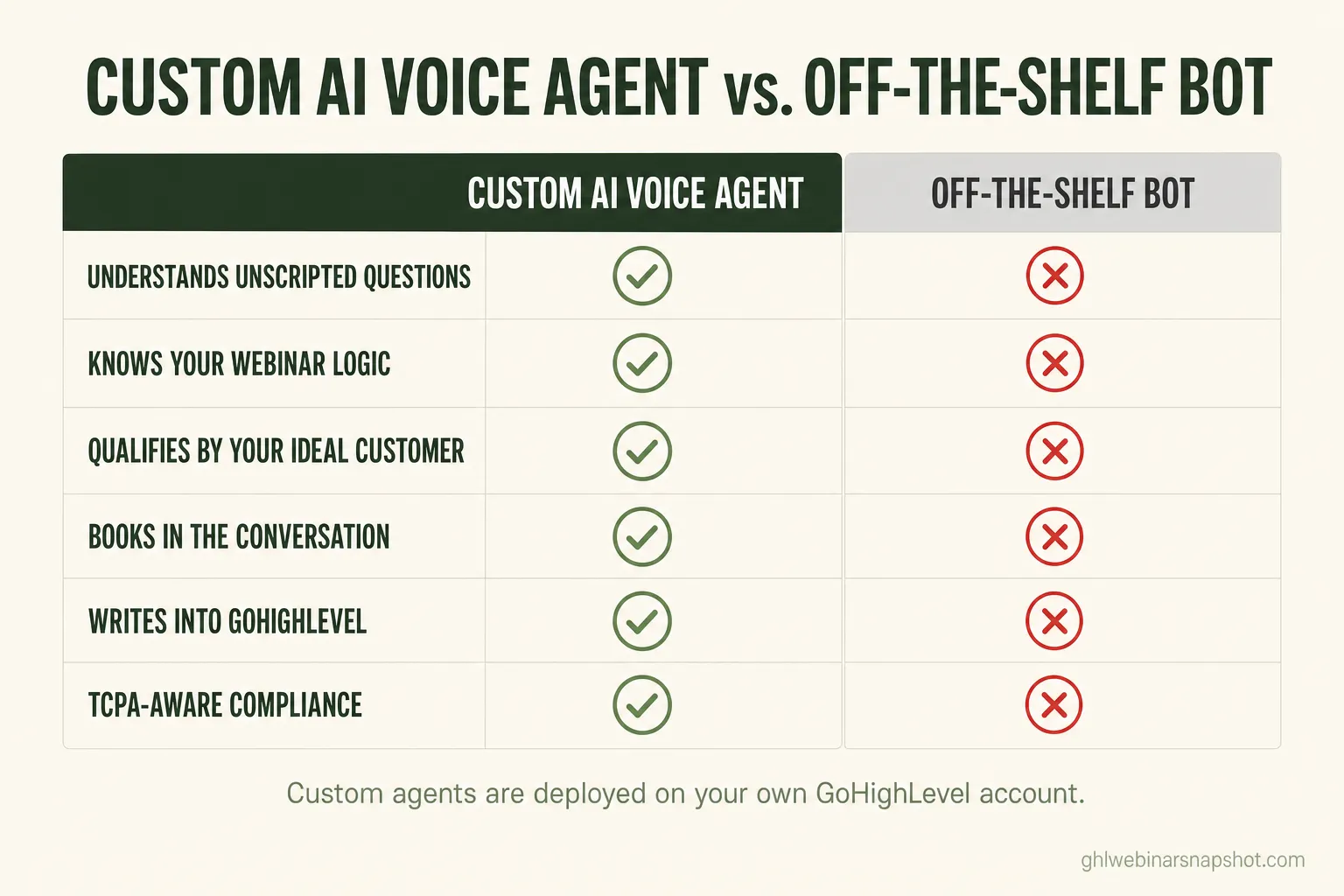
That’s what our custom software and agentic AI team builds: an AI voice agent on VAPI or Retell with Claude behind it and Twilio telephony, trained on your webinar model, wired into GoHighLevel, and TCPA-aware by design — typically in about two to four weeks, with full IP transfer so you own the code. If you’d rather start with the version that ships in the snapshot, the built-in AI Caller answers, qualifies, and books 24/7 out of the box.
What this means for Raleigh webinar businesses
In a market as dense and business-heavy as Raleigh and the Research Triangle, answering every call instantly is a real competitive edge — because your audience expects it and most of your competitors still let calls hit voicemail. North Carolina is home to 1.1 million small businesses, which make up 99.6% of all NC businesses and employ 44.2% of the state’s workforce, per the SBA Office of Advocacy. A large slice are coaches, consultants, and founders running the same kind of webinars you are.
Two local realities sharpen the point:
- Your audience is tech-forward and impatient. In a region built around research, universities, and software, a prospect who calls with a question expects an answer now — not voicemail and a two-day wait. Meeting that expectation with a voice agent signals competence before the webinar even starts.
- You’re competing for the same seats. When several Triangle coaches run similar masterclasses to overlapping audiences, the experience of trying to register becomes a differentiator. Capturing the caller who would otherwise have bounced — and then, per ON24’s 2025 benchmarks, holding a 60% registration-to-attendee rate into the live room — is how you fill seats without simply buying more traffic.
Automation is also how a small operation competes with a bigger one: Zapier’s research found 88% of small and midsize businesses say automation lets them compete with larger companies. A voice agent is one of the highest-leverage places to spend that advantage. If you’re weighing the full funnel, pair this with our 2026 webinar benchmarks and the case for treating show-up rate as the metric that compounds — and if the phone isn’t where your leads hesitate, the same instant-answer logic applies to your registration page, which is why an AI chat widget often out-converts a static form.
FAQ
What is an AI voice agent for a webinar business?
It's a natural-language phone agent that answers inbound calls 24/7, holds a real conversation, qualifies the caller against your ideal-attendee criteria, and either registers them for your next webinar or books a sales call — then logs everything into your CRM. Unlike voicemail or a phone tree, it responds instantly and takes action in the moment, which matters because 64% of consumers and 80% of business buyers now expect real-time interaction (Salesforce) and the average business takes 42 hours to make first contact (Harvard Business Review).
How long does it take to set up an AI voice agent?
A custom voice agent trained on your funnel typically takes about two to four weeks to build, test, and deploy — mapping your calls, scripting the qualification flow, connecting your calendar, wiring it into GoHighLevel, and setting your compliance posture. If you use the AI Caller that ships in the snapshot, it's live much faster because the answering, qualification, and booking logic is prebuilt; you're mostly configuring your greeting, ICP questions, and calendar.
Does an AI voice agent work with GoHighLevel?
Yes. A well-built agent writes every call into GoHighLevel — creating or updating the contact, adding tags for source and qualification, moving the contact into the right pipeline stage, and triggering the follow-up workflow or reminder cadence. That integration is the point: the phone conversation becomes part of your CRM, lead scoring, and reporting rather than a disconnected tool.
Is an AI voice agent TCPA compliant?
It can and must be, but compliance is on you as the operator, not the tool. If calls are recorded, capture consent per your jurisdiction (some U.S. states require all-party consent) and disclose that the caller is speaking with an AI. Any SMS the agent sends must respect TCPA — clear consent and a working STOP opt-out — and reminder texting at scale needs A2P 10DLC registration. Build these in from day one rather than retrofitting them.
Should I build a custom voice agent or use an off-the-shelf bot?
Use an off-the-shelf bot only if your calls are simple and repetitive. For a webinar business, a custom agent trained on your funnel wins where it counts: it understands unscripted questions, knows your live-vs-evergreen logic and replay windows, qualifies by your ICP, books in-conversation, and writes cleanly into GoHighLevel. A generic bot usually just collects a message for someone to answer later — which reintroduces the exact follow-up gap you were trying to close.
About the author
Derek Haywood is a GoHighLevel automation engineer based in Denver, CO. A former B2B SaaS sales engineer, he now builds the plumbing behind webinar funnels — tags, triggers, lead scoring, replay-tag pipelines, and the voice and chat agents that qualify leads without manual CSV scrubbing. He has a low tolerance for broken automations and an even lower one for vague compliance hand-waving.
Related reading
- AI Receptionist for Coaches & Course Creators: Why Missed Calls Are Costing You Webinar Sales
- How to Book Sales Calls From Webinars: The Attendee-to-Consult Playbook
- Webinar No-Show Recovery: Win Back the Registrants Who Didn’t Attend
- SMS Reminder Compliance for Webinars (TCPA + A2P 10DLC, Plain English)
- AI Chat Widget vs. Contact Form for Webinar Registration
Sources
- Salesforce, State of the Connected Customer — 64% of consumers and 80% of business buyers expect real-time interaction.
- MIT / InsideSales.com, Lead Response Management study (Dr. James Oldroyd) — responding in 5 minutes vs. 30 makes you ~21× more likely to qualify a lead.
- Harvard Business Review — The Short Life of Online Sales Leads: 42-hour average first response, 23% never respond.
- ON24 — 2025 Webinar Benchmarks Report: 60% registration-to-attendee conversion, 239 average attendees.
- Zapier — The State of Business Automation: 88% of SMBs say automation helps them compete with larger companies.
- SBA Office of Advocacy — 2025 North Carolina State Profile: 1.1M small businesses, 99.6% of NC businesses, 44.2% of employees.